Windows 3.1 removed real mode support thus breaking compatibility with Windows 2 and Windows 1 apps.
What Microsoft did is replace various included applications completely with every upgrade. There's no compatibility. Things like notepad.exe for Windows 1 is simply replaced with a version made for Windows 3.1 when you upgrade. Likewise when you upgrade from 3.1 to 95.
You absolutely cannot run Windows 1 applications in modern day Windows. Heck the CPUs these days literally do not support real mode anymore. You can upgrade but that's really just a series of complete OS replacements in this case.
> Heck the CPUs these days literally do not support real mode anymore.
They do, actually; a brand new Core i7 still runs 16-bit real-mode and 32-bit real-mode.
Now, if you're running in 64-bit mode, there's no vm86 mode you can use to run 16-bit applications on a 64-bit kernel. However, the CPU still supports 16-bit real mode, and under a 32-bit kernel you can run 16-bit applications.
And indeed, Wine can run 16-bit Windows applications on 64-bit Linux. You could say that at this point Linux is more Windows-compatible than Windows itself :)
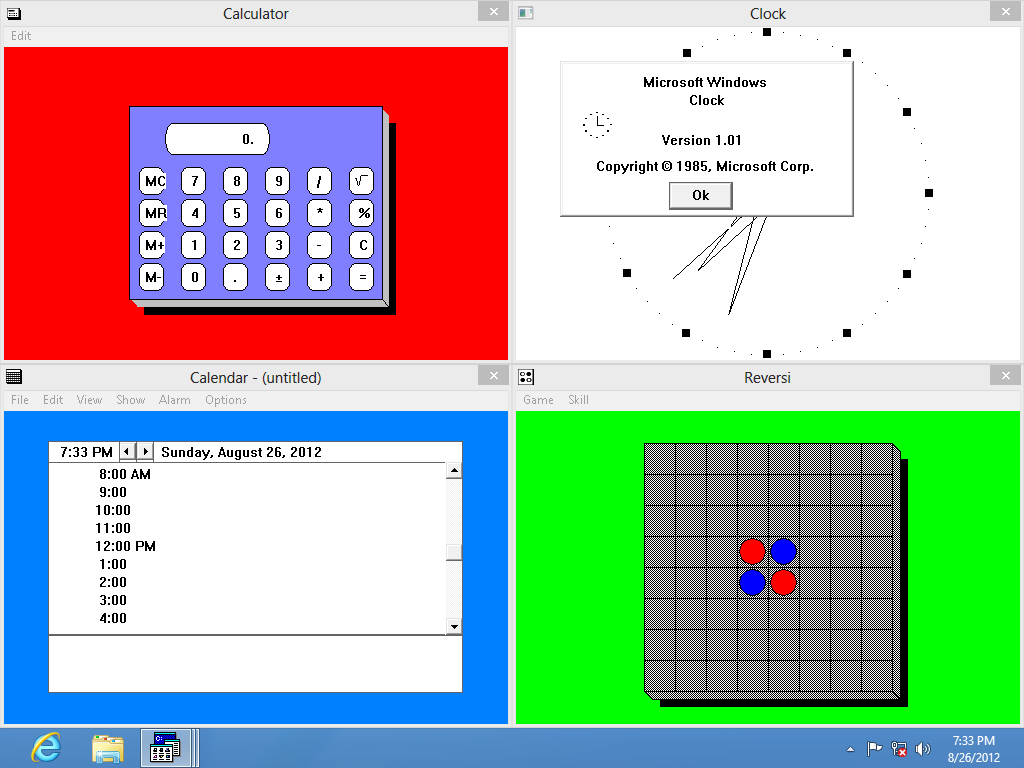
Nope, this is binary compatibility. The apps you see in the screenshot are binaries straight from Windows 1 install media. Literally every 16- or 32-bit version of Windows from 1 to 8 will run Windows 1 apps.
I'm sorry if I was unclear in my wording, I mean the modern Windows version must be 32-bit to be able to run 16-bit Windows apps.
Windows 3.1 removed real mode support thus breaking compatibility with Windows 2 and Windows 1 apps.
That's just not true. Windows 3.1 removed real-mode support in Windows itself -- in other words, the last version you can run on a 8086 CPU is Windows 3.0.
But pre-3.0 16-bit Windows apps certainly didn't stop working.
The trick there is that there is no such thing as "real-mode windows applications". The 16-bit ABI is essentially same regardless of whether windows run in real mode or protected mode.
Also, it is true that Windows Setup would replace old bundled applications with the upgraded versions (otherwise it wouldn't really be an upgrade,) but if you had older applications that didn't come with the new OS (REVERSI.EXE was no longer available in Windows 3.1, there was no CARDFILE.EXE in Windows 95, and so forth) Setup would just leave them alone, and they would run happily on the new OS.
There were some exceptions to this; I remember as a kid upgrading my 486 from Windows 3.1 to 95 for the first time, and being disappointed that Setup replaced Paintbrush and Write with Paint and Wordpad, because I liked Paintbrush better. It actually replaced PBRUSH.EXE and WRITE.EXE with dummy EXE:s that would just launch MSPAINT.EXE and WORDPAD.EXE instead. These dummy files are still in recent Windows versions for compatibility with stuff like ancient apps that create shortcuts to launch Write with their docs.
It was trivial to retrieve PBRUSH.EXE from Windows 3.1 install media, however, and it works fine on Windows 95 as well as every subsequent 32-bit Windows.


What Microsoft did is replace various included applications completely with every upgrade. There's no compatibility. Things like notepad.exe for Windows 1 is simply replaced with a version made for Windows 3.1 when you upgrade. Likewise when you upgrade from 3.1 to 95.
You absolutely cannot run Windows 1 applications in modern day Windows. Heck the CPUs these days literally do not support real mode anymore. You can upgrade but that's really just a series of complete OS replacements in this case.