Occasionally that better execution is overlooked because it looks like just a bunch of features, but a confluence of features often changes the game.
A rope and pulley attached to a vertically-moving platform existed for a really long time, and then someone bolted on a ratchet, and it became an elevator, which (with some iteration, and marketing) gave birth to skyscrapers. Another one is LXC, which existed for 5 years before Docker's confluence of features (and impressive marketing) made it ubiquitous and changed the [backend] tech landscape.
And before them both, chroot jails... at a high enough level of abstraction this reminds me of "there are only six plots", but occasionally a book will change the world.
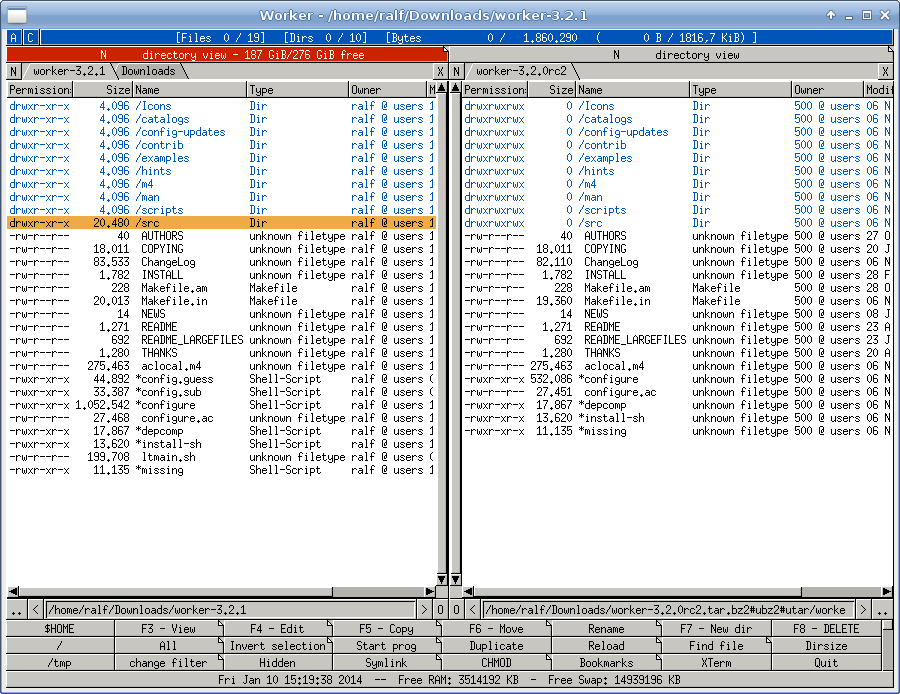
These types of file-managers are called 'Orthodox file managers'. [1]
In answer to your question of which was the first, the answer appears to be PathMinder (1984) and Norton Commander (1986). Both were for DOS so it seems to be an original innovation from the DOS world. Directory Opus first came out in 1990.
I wasn't familiar with PathMinder before looking at the wikipedia article but I was familiar with Norton Commander, as I think nearly everyone who used DOS in the late 80s would be. I personally favoured XTree (1985) more. Xtree didn't originally have the two pane view, but added it in 1989.
"Double Commander (https://doublecmd.sourceforge.io/) is a free cross platform open source file manager with two panels side by side. It is inspired by Total Commander and features some new ideas."
> _Once you get used to two panes, it's hard to go back._
Just as a data point, I tried that and I never could figure out how to populate the left pane and the right pane in such a way that it was helpful. (I.e. that copy and move did the right thing.) It just felt pointless to me.
I've used vifm a few times, but only after figuring out how to turn off the two-pane split :-)
In the days of applications with no concept of standard file dialogues, running on single-tasking operating systems, for platforms where disc media were sold unformatted, and needed low-level formats, it really was.
Being able to format a floppy disc and continue to do things on OS/2 without applications becoming seriously jerky was also a feature. (-:
CentralPoint PC Tools seems little remembered nowadays. It was quite an extensive toolkit, as I recall. File viewers for various types of database/spreadsheet/wordprocessor files. Disc and file hex editors. Repair utilities. Extended directory change. A uniform look and feel, and a fairly good manual.
> CentralPoint PC Tools seems little remembered nowadays.
Indeed, up to the point that the name was usurped by some unrelated software.
It was very useful even in the later DOS era; it was a standard part of my travelling tech toolkit. It had one of the fastest floppy formatters around, and just about the fastest DOS disk-defragmenter I ever saw, nearly an order of magnitude quicker than Norton's.
The PC Tools backup/restore tool was also superb and extremely fast. It used an extended disk format, squeezing about 1.6 MB onto an HD 3½" floppy, and compressed data on the fly, so many megabytes of software or data could be squeezed onto the minimum number of floppies.
What doomed Central Point software is that it did a licensing deal with Microsoft. Cut-down versions of PC Tools Backup and the separate Central Point Antivirus were bundled with MS-DOS 6. Microsoft promised CP that CP would make money from DOS 6 customers wishing to upgrade to the full versions.
In actual fact, people got by with the freebie versions and CP's sales of standalone products _and_ upgrades both stagnated.
MS tried similar tactics on STAC in the hope of bundling the Stacker disk-compression tool with MS-DOS 6. STAC, wisely, said no.
So Microsoft just stole the code and used it anyway.
It used the money wisely, to diversify the company out of disk compression by acquisition, buying vendors of remote-control software (ReachOut) and enterprise backup (Replica).
Sadly, this was long before ubiquitous Internet connectivity, even by dial-up modem. ReachOut mainly worked by direct-dial modem-to-modem comms -- useful, but expensive, as each machine to be controlled needs a modem, a telephone line and its own phone number.
It wasn't enough and STAC ended up going broke. Central Point Software was bought out by Symantec, like Quarterdeck and Norton and others.
MS-DOS 6 was badly buggy anyway and MS had to release a free update, MS-DOS 6.2. (Note, at this time, product updates, service packs, etc. were extremely rare.)
Then, when it lost the STAC lawsuit, it released another update, MS-DOS 6.21, which simply removed disk compression altogether.
Then MS rewrote the offending code and released MS-DOS 6.22, another free update, replacing the infringing "DoubleSpace" with "DriveSpace" -- basically the same tool but with different compression/decompression routines.
This was the last-ever version of MS-DOS, and thus DOS 6 has the dubious distinction of being the most-patched release in history.
There are details of this on Wikipedia but it's been sanitised by MS PR so it merely mentions patent infringement, rather than the direct code theft involved.
I can't believe DOS Navigator [1] is not mentioned - true MDI in TUI using Turbo Vision. Ran circles around Norton Commander. Even had a freaking spreadsheet built-in!
for the current windows platform there is far manager: https://www.farmanager.com/ Unlike Norton it has plug-ins and there are a lot of them available.
Counter data point here. NC/VC since 90-ish, TC, MC, Far. Then suddenly it all lost fit and explorer/finder felt much better, with many windows and quick access pins. Explorer still lacks Finder’s inplace folder expanding, but that’s bearable.
Idk what happened exactly, but now I can’t stand commanders at all.
Fixing the number of panes at 2 seems a little arbitrary. I used dired in emacs and open precisely the number of panes I want: most of the time 1, fairly often 2, once in a blue moon 3, and I've never needed 4.
I've used it as a replacement for Total Commander on the Mac.
Another posted posted Marta, which I just downloaded and it seems to have almost the same features as Total Commander but in a free/open source offering.
Double Commander seems to be the most popular and featureful among cross-platform two-panel managers. However, its integration with the rest of the system is rather lacking on Mac.
Forklift made some questionable choices in the version 3. The app became much slower.
There's a significant underlying principle there. Commom UI widgets are not prepared to deal with collections of widely varying sizes.
The two-pane file browser (folder tree plus folder contents like Windows 95 Explorer, or two parallel panes like Norton Commander) was a compromise solution that has worked for decades.
But this idea of showing in context a limited view of representative items of each collection could be generalized and exploited in other generic data-heavy interfaces, where there's no business code to show the specific data loads in the best way.
It's the zero/one/infinity rule. Programmers don't even know what it's called, they just absorb it by osmosis. But in the real world there are so many lists that will never have more than 20 items.
Well, I'd say the rule should be upgraded as zero/one/small-sample/expand-for-infinity, at least for user interfaces (not for coding, although doing it for coding is what lazy evaluation is for).
> Commom UI widgets are not prepared to deal with collections of widely varying sizes.
I don't think there is a standard widget other than what's implemented by each solution. Broot is one way of looking at a volume at the expense of lots of disk reads (for every file on the volume). Ranger does that at a single depth and that's a design choice in Miller's view. nnn doesn't prefer to read within directories unless explicitly requested and that's a design choice too. There's nothing good or bad about these other than a choice to the user to pick the one that fits his use case.
A user always has the liberty to concentrate only on the current directory, just know where he is in the filesystem from the file path and do a fuzzy search to find a file deep in the subtree when he needs to do so. As you might have noticed, even with Broot there's no simple way to list the files marked "unlisted" without navigating to the dir and expanding it. It's a nice program and is a solution to people who likes to see a snapshot of the filesystem in a glance. But would everyone be always interested in the contents of /etc, /run, /usr and /var as shown in one of the sample images?
Anything listed at https://en.wikipedia.org/wiki/Graphical_widget#List_of_commo... does count as "standard widgets". There may be variations in different GUI libraries, but anything that deviates too much from common user expectations will be perceived as broken.
There are ways to avoid traversing the whole volume in each use, namely caching each directory content when it's updated.
As for always showing unwanted information, an interactive solution could allow an option to "fold and hide" specific folders so that their contents are not shown until the user specifically reopens them. A user-friendly interactive solution doesn't require the user to remember and choose among all the available choices for each use, it provides good defaults and reminders on how to access alternative options when those are needed.
One of the guiding principles of nnn is minimum disk IOs so probably it's not comparable in this respect. Reading through a complete volume on a stuffed microSD or SD card attached to a RaspberryPi to list the filesystem and then supporting dynamic events may not be very simple. nnn development is driven by minimum resource availability and usage.
Yes, but that's a less informative solution, as you can only see contents of one directory at a time. Broot provides a more comprehensive view of the file system.
I assume you all know Midnight Commander (mc) - because of my Norton/Total Commander past, this is still something I always install on my machines (although using it less often)
The leave will be formalised, but it won't become completely effective till they will agree on the new trade rules; until then it will act economically as if it were part of EU.
Correct, net after all expenses. My goal is always to have 100-200 free at a minimum but in the end the rental cashflow isn't to build monthly income (in my case), but instead to build equity in the property.
There was a period of time I did it for monthly cash flow, and when I did that I'd target different types of properties and target a different minimum free cash flow. But I switched my investment strategy to be one to maximize equity and property value, I've found this to be far more profitable in the medium to long term, but obviously doesn't provide the highest monthly income initially.
I don’t know if I’ve “made it”, but two years ago I started a small consultancy which increased my per-hour billing to almost triple compared to when I was an employee doing the same thing. I use this extra cash flow to work 25-30 hour weeks.
Recently, I started to offer this setup “as a platform” to previous co-workers taking a 20% cut of their billing. If I get to five I can stop working all together.
It’s not a software system, but rather me figuring out and abstracting away stuff like payroll, taxes, bookkeeping, client acquisition, insurances , pensions and everything else that makes developers’ palms sweaty when they think about going freelance.
Right now this doesn’t eat up all too much of my time so all is done in Excel basically. But if we’re, say, 10 devs I’d reconsider building something.
Where I’m located (northern EU) consultant is a fancy word for contractor. However, due to the shortage of people I can charge 95€/hour where the fully loaded cost for an employee is around 30-40€/hour.
We’re all run-of-the-mill .Net developers, but we all have a niece (mine is finance and pension funds).
I suspect this is wildly individual. I myself prefer down pillows while my wife sleeps on one filled with wheat. My second favorite pillow is actually the IKEA Kornvallmo.
Yes. Spolsky in particular was a content marketing genius- his blog managed to garner a large audience, which in turn generated far more sales of Fogbugz than the software itself ever deserved.
Marketing is an important part of any business, so fair play to him.