Wow, I didn't realize the little article I wrote for Lifehacker would have such a big impact on this project. Also didn't realize he had passed on the project to Cloudflare. They're a great team so I'm happy it's in their capable hands now!
Having struggled with RSS in the past, I will give a few reasons of why I ended up removing RSS from my blog:
1. RSS traffic trickled down to almost nothing. Hardly anyone uses RSS any more as a daily reader^1.
2. Spammers were using my RSS feed to wholesale copy the content from my blog. Identical copies of my blog went up in several different locations, each with their own copy of ads from the scammers. Some of these blogs ranked higher than mine for certain search terms. Google would eventually catch on and remove them, but it was like playing whack a mole.
3. We did not make any money from the RSS feed. Even if we did find a way to monetize it (injecting ads into the feed, for example), see #1.
As a techie, yes yes yes I would like to have an RSS feed. But from a business standpoint, it doesn't make any sense these days.
Yup. I wouldn’t subscribe to the Athletic without an RSS feed. I stopped reading Players Tribune when they axed their feed. Give me title, tags, and first two sentences so I can categorize the feeds and I’m a happy camper. I got rid of my reddit app on my phone. I was needlessly checking reddit multiple times a day. RSS provides me the same information without having to argue with people who are “wrong online.”
This solves #2 as well, to the extent that copying your content wholesale becomes almost as hard as it would have been had you not had an RSS feed in the first place.
Except now your readers have to click out of the RSS reader, rather than stay in there and read. I find it jarring and obtrusive to do that, and prefer just to visit the site instead if they RSS did this.
I usually prefer that as well, but if the choice is no RSS and headline+excerpt RSS, I’m absolutely fine with the latter. Without RSS I won’t read any regular content.
Most readers embed a browser making this pretty simple.
I prefer content embedded in my reader, but I don’t mind clicking through if it helps the author. Though, in my case I doubt it will since I’m blocking any kind of trackers, which includes many ads.
While Google trends depicts decline in search frequency so it may correlate with actual usage, it could as well mean that the "RSS market" is stable and saturated ("everybody know about it, so no need to search for it").
If you came to this conclusion while looking at your access logs, keep in mind that single request from some web-based reader could "feed" hordes of subscribers. In scenario desktop RSS readers were completely abandoned and everybody used web-based RSS reading services, there would be just ~ services count × their check frequency requests, from which it would be really hard to abstract subscriber count, I guess.
Maybe there is exact way to determine this usage I'm not aware of? Are those services telling back subscribers count in their requests? Or do they publish this information in some standardized way? I really would like to know…
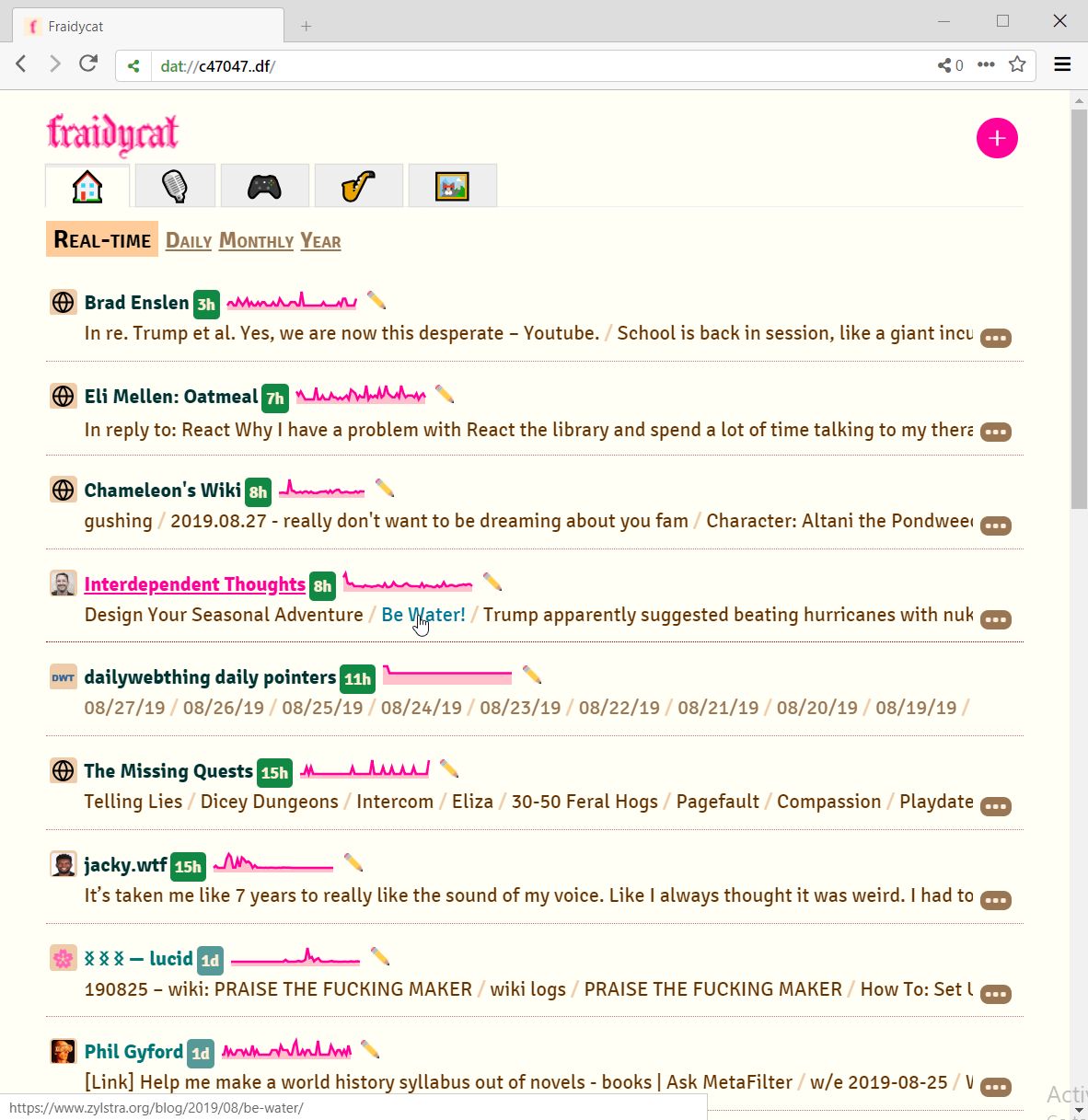
While it's true that RSS has died, I'm using it more than I ever did when Google Reader was around. Many people are using Feedbin or mobile RSS readers. I've been idly working on my own RSS reader that actually answers some of your concerns. It doesn't excerpt blogs, but just gives me an overview of what's happening out there: https://www.kickscondor.com/images/fraidycat-aug2019.jpg
My problem isn't a business issue - it's that I find news feeds chaotic and want to read blogs directly - with their design and layout, focusing on the writer directly, rather than amid a pile of distractions. (To me, even Google Reader had that problem.) But I think it's cool that our separate concerns are both answered if RSS is used for notification rather than for syndication. RSS notifies my reader tool and then I can see an overview of what's happening out there when I make time to read.
I don't think we've quite explored the possibilities that RSS opened for us.
> Identical copies of my blog went up in several different locations, each with their own copy of ads from the scammers.
Tangent but: Does google have any official way to combat this?
It seems like an easy enough problem to solve. As the content-creator, you could submit your content first to some kind of registry, so that google could identify you as the true author. Does anything like this exist? If not, why not?
It seems like this could be open to abuse. Not all content-creators will register their content, so find some unregistered content to copy, and then register it yourself.
This is an old problem and the primary solution is to delay the content in your feeds/sitemaps by X number of minutes so that Google can spider the content on your website first while flagging the spam site as duplicate content. Another tip is to add a canonical link back to your article in the content of feed articles. e.g. rel="canonical"
How do you meaure this?
Since so many people uses online reader, it is very likely that one single request made to your server is in fact some online aggregator which may redistribute it to an unknown amount of readers...
This seems interesting, but without knowing what a course looks like, I won't sink $84 into it.
If the creator(s) are reading, I would suggest making the first chapter free. That would work better to get visitors to sign up & pay. For example, from what I can see there are 9 missions, so the first is free, pay to continue.
Thanks so much for the feedback! We've changed it to the first week free, so you can see the entire course in that span if you'd like. Hope you like it!
If you include your name and email (no worries about the PayPal page), we will send you an activation link. Let me know if you did not receive this link and I'll send you one personally.
This has been coming for a while. We attempted to create a push-based notification system based on MQTT. It worked well, then the notifications started getting lost. Turns out, the receiver service was getting killed in the background. We found out the best way to get reliable notification was through Google's own GCM (which has now moved to Firebase Cloud Messaging.
We learned its incredibly difficult, if not impossible to build an app (with reliable notifications) that do not use Google services.
You can say its in an effort to maximize battery resources, which I totally understand, but by requiring a Google service (and now library) you are truly tied in to and reliant on their systems.
This has been true for awhile once they forced apps to use API26 or higher (if you want to be listed in the Play store, and really, there is no other place if you want decent exposure.)
I had a similar experience switching from "real background" to using FCM. I understand the battery saving motivation, but the problem is that the performance of the google service is terrible. The response time of my simple notification system was nearly instantaneous, but OK google, I'll play your game. I put together something that used FCM and it can take 15 or 20 MINUTES to get even a "high priority" message from FCM.
Reading the google docs, apparently google will deprioritize notifications that are shown but "not intereacted with" in a timely manner, so that is another source of delay.
I think the crux of the matter is that notifications have multiple purposes: signaling, and advertising, etc. Google hasn't provided a way for an app to declare its use case. So, you get policies to prevent notification spam creeping in and messing with basic app signaling functionality.
In the end, I kept both my "in-house" notifications for use by older Androids, and a kluge that uses FCM in addition, with some hacks to get somewhat better FCM performance. I live with the notification in Oreo+ and just tell users to ignore it (but honestly, I don't think users care that much.)
>The response time of my simple notification system was nearly instantaneous, but OK google, I'll play your game. I put together something that used FCM and it can take 15 or 20 MINUTES to get even a "high priority" message from FCM.
Letting your phone actually sleep is the battery saving feature. Also, you get throttled for high volume so check that as well.
If you think your messages are so important to have a constant socket open then make a foreground service. You're abusing a system that is really not suited to your needs.
Some types of messages do require immediate attention of the user, or are of highest value if delivered immediately. Instant messaging apps have been using notifications for a long time and did not require a foreground service. Expecting instant delivery of that class of messages is not abusing the system.
Even Apple, with its distaste for background processing, lets you declare an app with "VOIP" mode or something, where iOS manages the socket for you. You get access to simple server-based signaling, and as a bonus, you get to avoid the whole push-notification system.
Google just seems to have glommed everything into FCM. In the FCM console, push-notifications are really treated as a user-engagement/advertising thing. Throttling and spam prevention makes sense for that.
Maybe Android has something like the iOS VOIP mode that doesn't involve annoying the user with scary battery notifications, but I couldn't come up with anything at the time.
While it's not really possible to do this in your own background service any more, GCM still supports this use case. This is the deprioritization the grand parent is talking about. If there's already a notification showing you won't get instant follow up responses. It's a compromise to be sure but if you want to break that compromise you have to make a foreground service.
It was supposed to be possible, via standard notification mechanism and scheduler, new in 7.x. If Google starts flagging apps pinging network off the scheduler, everyone will get even more angry, as there will be a glut of foreground notifications just because they broke a use case.
For my use case, the volume of messages was not an issue. This isn't a huge app that is pushing out tons of notifications. We're talking 10's or 100's a day, maybe.
In fact, it didn't matter at all once the initial notification was visible whether follow-on notifications were displayed. Possibly the fact that I was locally dropping the notifications (because the user didn't need them), the system counted those as "notification that weren't interacted with, so I'm going to slow you down at the server."?
I have no idea, and no way to find out, since FCM is pretty opaque at this point.
15-20 minutes for a high-priority FCM message isn't normal.
Either your app is being rate limited by the server, or there's something unique about your network setup that is preventing push messages from getting through. There's not enough context here to know what's going on.
(Plenty of instant messaging apps use high-priority FCM messages, and get near instant delivery.)
I agree, it isn't normal, and I was scratching my head at the time as to why FCM would deliver the messages near instantly on older android models. The delayed delivery happened on Oreo+ phones. Oddly, I also noticed Whatsapp not delivering messages in a timely fashion (even when I had it opted out of battery saving). Background notifications in general started acting odd for Oreo+ phones.
> There's not enough context here ...
Sadly, actually getting context you can use to debug something like this from FCM is nearly impossible. The end result is you just take a WAG and hope for the best when the app gets in the field.
Signal switched to FCM about 4 months ago and I've had constant delayed-notifications issues too, usually in the 20 minute range. I can see the problem in Signal itself, the "sent" and "delivered" timestamps will be 20 minutes apart despite be actively doing stuff on my phone -- so the internet connection is there and the phone isn't sleeping. When I actually re-open the Signal app all the notifications flood in at once.
Maybe Google is assuming I don't care about Signal notifications because I don't always "interact" with them right away (I'll leave messages on unread for a bit if I'm busy), but I really wish there was a way to mark Signal and other instant messaging apps as "always high priority". Signal has battery optimizations disabled but that doesn't seem to help.
Hey! Signal dev here. We've actually seen delayed notification both before and after the switch to FCM. My guess is that newer Android versions are just becoming more and more aggressive with their battery optimizations.
We send high-priority FCM messages, but the device will still bundle them together in order to deliver them in batches. Even worse, there are times we are delivered an FCM message but network access will be invisibly restricted, further delaying our ability to retrieve the actual message content (for obvious reasons, we can't include the message content in the FCM message itself). We're continuing to try new things, but it'd be nice if there was some official guidelines on how to avoid these FCM pitfalls.
If you receive "actual contents" separately from GCM ping, you are probably being hit by Doze Mode. Doze is disabled for foreground Services, so your best bet is starting a foreground Service (via startForegroundService) _and_ taking wake lock (from within foreground Service, after your app is considered fully foreground).
Historically Android devices used to sleep by entering low-power CPU mode (sometimes complete with low-power radio and WiFi modes). In that mode all apps and kernel are heavily CPU throttled to the point when you can get network timeout because kernel TCP stack can't send packets fast enough. This is what gets disabled when you take a wake lock.
Doze Mode throttles individual apps by moving them into low-priority cgroup. In effect Linux kernel hardly ever schedules your process anymore. Doze Mode is not disabled by wake locks, only by starting a foreground Service.
Both Doze Mode and low-power CPU mode can coexist, leading to effectively 110% loss of CPU time by your process.
Interesting, so our current method is to do just what you said -- start a foreground service and acquire a wakelock. But we only do it if our network request takes longer than n seconds (to avoid always showing foreground notifications). We still hit the issue. Other Googlers have told me I may be running into some race condition that happens with foreground services and doze.
Thank you for the detailed info about how those modes work though -- it certainly de-mystifies the network problems!
> Interesting, so our current method is to do just what you said -- start a foreground service and acquire a wakelock. But we only do it if our network request takes longer than n seconds
This won't work. One of the less documented properties of Doze Mode is it's ability to sever your network connections. It can already be in action before you start downloading message contents. It can also kick in during the download. If you want reliable delivery, you have to take wake lock and enter foreground mode immediately after getting GCM push.
Look up, what is WakefulBroadcastReceiver, and why it used to be necessary. The class itself is deprecated (because implicit broadcasts are largely obsolete), but it shows, how one can miss opportunity to take a wake lock, causing entire application to be caught in deep CPU sleep. Google promises, that GCM will bring you out of Doze Mode, but I am not sure, if that also applies to wake lock. Your app may be sleepy because of failure to timely take wake lock, causing it to miss time window when Doze is temporarily lifted by GCM.
Thank you for your work on Signal. Despite my griping, Signal is still my primary messaging app and I love it.
>there are times we are delivered an FCM message but network access will be invisibly restricted, further delaying our ability to retrieve the actual message content
This is new... If this is happening regularly, maybe you should display a generic "message available" notification? I assume actually opening the app un-restricts network access and everything works fine from there -- it'd be nice to know I have a message waiting in limbo.
> I put together something that used FCM and it can take 15 or 20 MINUTES to get even a "high priority" message from FCM.
(from what I remember of some android documentations) Your definition of "high priority" is different from Google's one, which is also different from the end-user's definition. Google probably favors the end-user's preferences more than the developer's preferences. If the user wants all notifications asap from a particular app, the system will do a best effort to deliver, given all the other apps notifications and the current battery level.
Have you tried using VAPID? I didn't want to use firebase and the pwa app I made uses VAPID instead and push notifications show fine. Couldn't that be used in native push notifications, too?
Had the opposite reaction. Went in not knowing, then when I saw Tarkin and Leia I was kind of thinking, wtf? They digitally rendered their faces? When I talked to friends afterwards they didn't notice it. This must be pushing some sort of mental limit of our brains - not everyone recognizes faces/cg the same as others.
I was blown away by Tarkin, I kept thinking how in the heck did they bring him back exactly as he was? Leia was another matter, something was not quite right with her.
Out of curiosity, did you see it in 3D? Most of my friends that saw it in 3D were complaining about how bad the renderd Leia and Tarkin were, but very few of my friends who saw it in 2D had any complaints about it.
I'm curious too, since the max resolution appears to be 220x220 on a 2GB GPU in my testing. If that is a linear relationship, it seems like it would be ~ 1080x1080 for a 12GB GPU.
Oh wow, the TI-99/4A, I learned BASIC on this computer! If you didn't have the tape storage unit, which could save data onto an audio cassette, you had to re-type your program into the computer if the power went out or unit was reset.
It was my family's first computer and the one I wrote my first programs on. Three things that stuck in my craw about it were:
1. BASIC supported PEEK but there was no POKE.
2. You could save files to a disk but you had to remember the file names because there was no way to list them.
3. Lower case letters were just small versions of uppercase.
For the last one, a year or so ago I actually found a dump of the Apple IIe font and hacked an emulated TI-99 to use it, and it worked and looked great, so I have no idea what they were thinking.
Anyway, it's awesome to see them be able to squeeze so much out of it in this demo.
If you plugged in the Mini Memory cartridge, it added a POKE command to TI BASIC.
There was a common cartridge, "Disk Manager 2", which gave you common DOS-like disk management utilities.
The lowercase font really was absurd. A few programs redefined them with much more pleasant fonts. The "Adventure" module for running the Scott Adams text adventures comes to mind.
First "real" program I ever wrote -- at age 12 or 13 was on TI-99/4A. I've never been into video games so I wrote a program to manage my paper route. Back then there were these paper publications called newspapers and kids could get jobs that entailed walking around the neighborhood without adult supervision and delivering the papers to houses. Also collecting money once a month.
I had a customer file (on cassette tape of course) and it tracked how much each customer owed, etc.
It was a spaghetti mess I'm sure as I knew nothing about programming but I got it to work.
Of course a paper ledger would have been just as good (and probably faster to use) but where's the fun in that?
I still have mine in the closet. I learned to code in TI BASIC on that beautiful machine. I've kept it for 35 years because it's the biggest single influence from my childhood on who I am today. I should pull it out and relive some old memories.
That said, there's no way in hell that video was a TI BASIC program. There were way too many sprites moving too smoothly around the screen. They must have made a custom cartridge.
I still have my first BASIC program for the TI-99 stored on a cassette in storage. My grandpa, who was an engineer at Parsons in Pasadena, bought it for me when I was 5 years old. My then 9-year old cousin then taught me how to program (Hi David, if you're reading this). We're both engineers now.
The program, incidentally, counts to 1,000,000 and outputs each number on the screen, it took 3 days to run.
My brother dropped off a box he saved for me a few years ago that contained my old TI tapes. A person on the TI-99/4A user group offered to read some in and provide emulator disk images. It actually worked and I was able to play the game I wrote back in 1982 again. Here's a screen shot http://i.imgur.com/4d74DqX.jpg
It was my first computer as well. I loved the crap out of that machine. I had Extended Basic, but I wish I had been able to get the editor/assembler cartridge and the expansion box. The voice synthesizer was one of my favorite things to play with. :)
Glad you noticed it! Thibault Koechlin is a valuable advisor who shares his feedback about the product. Also, we'll hopefully give some talks at hacker conference soon.
But naxsi and wallarm are too different products; they still have something in common though (using of nginx e.g.)
What I can tell you is that you are not alone. The startup/coding world, and even just the world in general can be very stressful. Many of us have gone through similar things as you.
It is important to figure out yourself first, and move on from there. You may sometimes try to handle everything internally and it is just impossible to do that all of the time. If you reach out to your friends and family I think they will be more supportive and understanding than you may think.
Feel free to reach out to me if you need someone to talk to - its my user @gmail.